

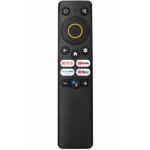

Realme 4K Smart Google TV Stick Remote Control (RMV2105)
এই রিমোটের প্রধান বৈশিষ্ট্য:
- ✅ Product: Realme 4K Smart Google TV Stick Remote Control
- ✅ Realme RMV2105 Remote Design
- ✅ Google Assistant Button & Yellow Navigation Ring
- ✅ Netflix, YouTube, Prime Video & YouTube Music Shortcut
- ✅ Power, Mute, Home, Back, Settings & Volume Control
999 ৳
Description
REALME 4K SMART GOOGLE TV STICK REMOTE
Realme 4K Smart Google TV Stick Remote Control (RMV2105)
Google Assistant Button | Netflix | YouTube | Prime Video | YouTube Music | Smart Navigation
Realme 4K Smart Google TV Stick Remote হলো Realme 4K Smart Google TV Stick (RMV2105)-এর রিমোট ডিজাইনের সঙ্গে মিলে যাওয়া একটি replacement remote control। পুরোনো রিমোট হারিয়ে গেলে অথবা নষ্ট হলে একই ধরনের রিমোট খুঁজছেন এমন ব্যবহারকারীদের জন্য এটি একটি সম্ভাব্য বিকল্প। অর্ডারের আগে ডিভাইসের মডেল ও রিমোটের compatibility নিশ্চিত করা প্রয়োজন।
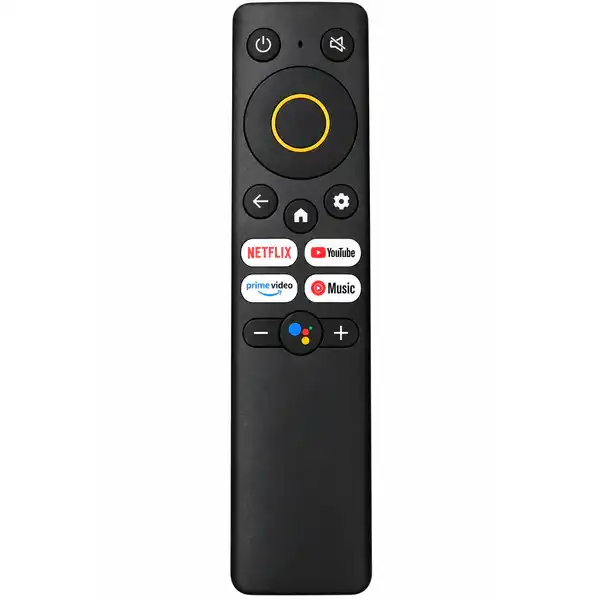
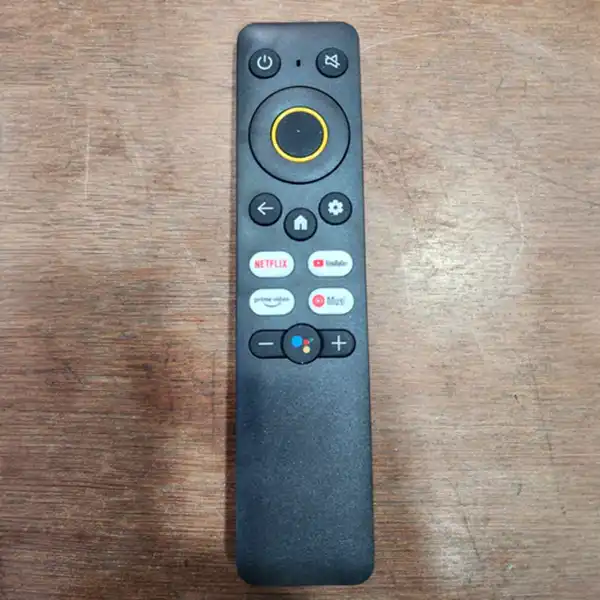
এই রিমোটের উপরের অংশে Power ও Mute Button, মাঝখানে হলুদ বর্ডারযুক্ত Circular Navigation Pad এবং নিচে Netflix, YouTube, Prime Video ও YouTube Music Shortcut Button রয়েছে। এছাড়া Home, Back, Settings, Volume এবং Google Assistant চিহ্নযুক্ত Button দেওয়া হয়েছে।
✅ Realme 4K Smart Google TV Stick Remote Features
Realme TV Stick Remote Control-এর compact button layout Google TV interface ব্যবহার ও entertainment application navigation সহজ করার জন্য তৈরি। ছবিতে নিচের controls পাওয়া যাচ্ছে:
- Brand Compatibility Reference: Realme
- Device Reference: Realme 4K Smart Google TV Stick
- TV Stick Model: RMV2105
- Power ON/OFF Button
- Dedicated Mute Button
- Yellow Ring Circular Navigation Pad
- Center OK/Select Button
- Home, Back & Settings Controls
- Netflix, YouTube, Prime Video & YouTube Music Buttons
- Volume +/- Control
- Google Assistant Icon Button
✅ Google Assistant Voice Control Button
Realme Google TV Remote-এর এই ডিজাইনে Google Assistant-এর জন্য dedicated button রয়েছে। Realme-এর অফিসিয়াল 4K Smart Google TV Stick রিমোটে Bluetooth Voice Control ও Google Assistant Voice Search সমর্থিত।
Compatible Bluetooth ও microphone-equipped replacement remote সঠিকভাবে paired থাকলে Google Assistant ব্যবহার করে supported content খোঁজা যায়। তবে এই নির্দিষ্ট replacement unit-এর voice ও microphone functionality আলাদাভাবে যাচাই করা হয়নি।
✅ Netflix, YouTube, Prime Video & YouTube Music
রিমোটটিতে চারটি জনপ্রিয় entertainment platform-এর আলাদা shortcut button রয়েছে।
- Netflix: Supported device-এ Netflix application access করার shortcut।
- YouTube: YouTube application দ্রুত open করার জন্য।
- Prime Video: Amazon Prime Video application access করার shortcut।
- YouTube Music: Supported YouTube Music application access করার জন্য।
এসব shortcut-এর কার্যকারিতা connected device, installed application এবং remote compatibility-এর ওপর নির্ভর করে।
✅ Yellow Ring Navigation & Smart Controls
Realme RMV2105 Remote-এর একটি পরিচিত ডিজাইন হলো হলুদ বর্ডারযুক্ত circular navigation control। এতে Up, Down, Left ও Right Direction ব্যবহার করে Google TV menu-তে চলাচল করা যায়।
মাঝখানের OK Button দিয়ে নির্বাচিত option confirm করা যায়। Back Button আগের screen-এ ফিরে যেতে, Home Button প্রধান interface-এ যেতে এবং Settings Button supported device-এর settings menu access করতে ব্যবহৃত হয়।
✅ Power, Mute & Volume Control
রিমোটের উপরের Power Button connected device-এর supported power function পরিচালনার জন্য ব্যবহৃত হয়। পাশের Mute Button দিয়ে শব্দ বন্ধ বা পুনরায় চালু করা যায়।
নিচের Volume – এবং Volume + Button দিয়ে supported audio volume কমানো বা বাড়ানো যায়। সব function সঠিকভাবে কাজ করার জন্য ডিভাইসের সঙ্গে রিমোটের compatibility প্রয়োজন।
✅ Realme TV Stick Remote Pairing
Realme-এর অফিসিয়াল নির্দেশনা অনুযায়ী Realme 4K Smart Google TV Stick-এর মূল Bluetooth Remote pairing করার জন্য:
- TV Stick চালু করুন।
- রিমোটে উপযুক্ত AAA Battery ব্যবহার করুন।
- TV Stick-এর কাছাকাছি রিমোটটি রাখুন।
- Home এবং Back Button একসঙ্গে প্রায় ৫ সেকেন্ড চেপে ধরুন।
- Screen-এ প্রদর্শিত pairing instruction অনুসরণ করুন।
বিশেষ দ্রষ্টব্য: এটি Realme-এর অফিসিয়াল রিমোটের pairing procedure। ছবির replacement remote-এর Bluetooth support নিশ্চিত না হওয়ায় এই পদ্ধতিতে pairing সফল হবে কি না, তা আগে যাচাই করা প্রয়োজন।
✅ Compatibility মিলিয়ে অর্ডার করুন
এই রিমোটের Button Layout Realme 4K Smart Google TV Stick (RMV2105)-এর রিমোটের সঙ্গে মিলে যায়। তবে একই ধরনের দেখতে সব Realme Smart TV, Android TV, Google TV Stick বা অন্য ব্র্যান্ডের TV Box-এ এটি কাজ করবে, এমন নিশ্চয়তা নেই।
অর্ডারের আগে আপনার পুরোনো রিমোটের body shape, yellow navigation ring, shortcut buttons এবং Google Assistant Button-এর অবস্থান ছবির সঙ্গে মিলিয়ে নিন। প্রয়োজনে ডিভাইসের model number জানিয়ে compatibility নিশ্চিত করুন।
⚠ অর্ডারের আগে নিশ্চিত করুন:
- আপনার ডিভাইসটি Realme 4K Smart Google TV Stick (RMV2105) কি না যাচাই করুন।
- পুরোনো রিমোটের Body Shape ও Yellow Navigation Ring মিলিয়ে নিন।
- Netflix, YouTube, Prime Video ও YouTube Music Button-এর অবস্থান পরীক্ষা করুন।
- Home, Back, Settings ও Google Assistant Button Layout মিলিয়ে নিন।
- Voice Search ও Bluetooth Pairing প্রয়োজন হলে কেনার আগে সেগুলোর কার্যকারিতা নিশ্চিত করুন।
- ছবির রিমোটটিকে Original Realme Product হিসেবে যাচাই করা হয়নি।
আরও Remote Control দেখতে আমাদের Remote Collection পেজ ভিজিট করুন।
Customer Reviews
Related Products
Family Size Mobil Chula – ফ্যামিলি সাইজ সিঙ্গেল বার্নার স্মার্ট মবিল চুলা
In stock
Reviews
Clear filtersThere are no reviews yet.